
In Part 3 of our series, we take the concepts explored in Part 2 and bring them to life with code. We’ll build a customer service agent that dynamically selects the appropriate tool based on customer queries. The agent will use LangChain and OpenAI to perform actions like checking order status and initiating returns.
Setting Up the Environment
Before we dive into the code, make sure you have all the necessary dependencies installed. You’ll need LangChain and OpenAI to create and use the agent:
pip install langchain openaiImport necessary libraries
We begin by importing the required libraries. LangChain provides the tools and agent infrastructure, while OpenAI powers the language model.
import openai
from langchain_community.chat_models import ChatOpenAI  # Updated import for chat models
from langchain.agents import Tool, AgentType, initialize_agent
from langchain.memory import ConversationBufferMemory
from langchain.llms import OpenAI
openaiis used for interacting with the OpenAI API.ChatOpenAIis used for initializing a conversational language model.ToolandAgentTypefromlangchain.agentsallow us to define and manage the agent and the tools it will use.ConversationBufferMemoryis used to store the conversation context, so the agent remembers the previous interactions.
Setup OpenAI API key
You’ll need to set your OpenAI API key to authenticate with OpenAI’s services:
# Set your OpenAI API key
openai.api_key = "your-openai-api-key"  # Replace with your OpenAI API key
Sample Order Data
We create a simulated database with sample orders. This database will help the agent to answer queries related to order status and initiate returns.
# Sample order data (simulating a database)
sample_orders = {
    "12345": {"status": "Shipped", "tracking_number": "ABCD1234", "items": ["T-shirt", "Shoes"]},
    "67890": {"status": "Delivered", "tracking_number": "EFGH5678", "items": ["Laptop", "Mouse"]},
    "11223": {"status": "Processing", "tracking_number": "", "items": ["Smartphone"]},
}
Define Tools
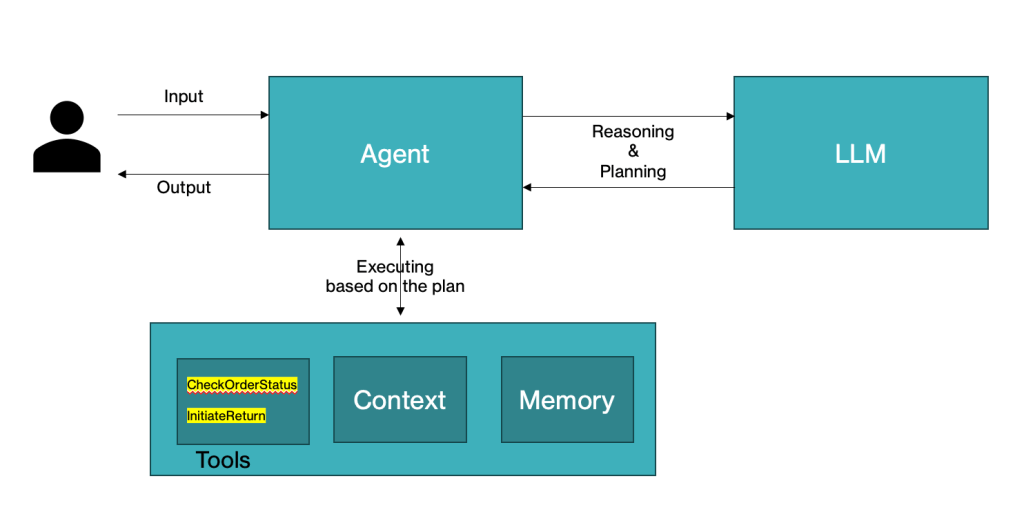
The agent will use two tools:
- CheckOrderStatus: To check the status of a customer’s order.
- InitiateReturn: To help a customer return an item from their order.
Each function is wrapped as a Tool, so the agent can use it when needed.
def check_order_status(order_number: str) -> str:
    """Function to check order status based on the order number"""
    if order_number in sample_orders:
        order = sample_orders[order_number]
        return f"Order {order_number} is {order['status']}. Tracking number: {order['tracking_number'] if order['status'] == 'Shipped' else 'N/A'}."
    return "Order not found. Please check your order number."

def initiate_return(order_number: str) -> str:
    """Function to initiate a return for an order"""
    if order_number in sample_orders:
        order = sample_orders[order_number]
        items = ", ".join(order["items"])
        return f"You can return the following items from order {order_number}: {items}. Please specify the item you wish to return."
    return "Order not found. Please check your order number."
Wrap Functions as Tools
LangChain provides the Tool object, which we use to define the tools the agent will utilize.
# Define a Tool for each function
check_order_tool = Tool(
    name="CheckOrderStatus",
    func=check_order_status,
    description="Check the status of an order and provide details."
)

return_tool = Tool(
    name="InitiateReturn",
    func=initiate_return,
    description="Initiate a return process for items in an order."
)
Memory Initialization
We use ConversationBufferMemory to ensure the agent can remember previous queries and responses. This is helpful for handling multi-turn conversations.
# Initialize memory for the conversation
memory = ConversationBufferMemory(memory_key="chat_history")
Initialize Language Model
We initialize the OpenAI language model – gpt-4o-2024-08-06 to process the customer queries.
# Initialize OpenAI LLM (Text completion model)
llm = ChatOpenAI(model="gpt-4o-2024-08-06", temperature=0.7)  # Using the new ChatOpenAI class
Initialize the agent
Now, we initialize the agent using initialize_agent. The agent can dynamically select which tool to call based on the customer query.
# Initialize the agent with the tools and memory
agent_chain = initialize_agent(
    tools=[check_order_tool, return_tool],
    llm=llm,
    agent_type=AgentType.ZERO_SHOT_REACT_DESCRIPTION,
    verbose=True,
    memory=memory
)
Process Customer Queries
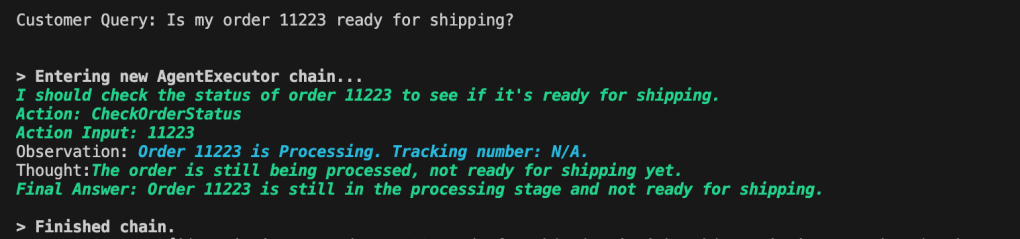
We define some sample customer queries and let the agent decide which tool to invoke. The agent uses invoke() to process each query.
# Sample customer queries
queries = [
    "What is the status of my order 12345?",
    "Can I track my order 67890?",
    "I want to return a T-shirt from my order 12345.",
    "How do I cancel my order?",
    "Is my order 11223 ready for shipping?"
]

# Process and get responses from the agent using the new invoke method
for query in queries:
    print(f"Customer Query: {query}")
    response = agent_chain.invoke(query)  # Updated method from run() to invoke()
    print(f"Agent Response: {response}\n")
Output
When running the code with the provided sample queries, the agent will intelligently respond with the correct tool based on the content of the query.

 Vijaymathialagan.ai
Leave a comment