In Part 2, we focus on how Large Language Models (LLMs), like OpenAI’s GPT models, can plan and use external tools to perform specific tasks in customer service. The core concept here is that the AI agent doesn’t simply respond to a query but intelligently plans which tool to invoke based on the customer’s input.
1. The Role of the AI Agent
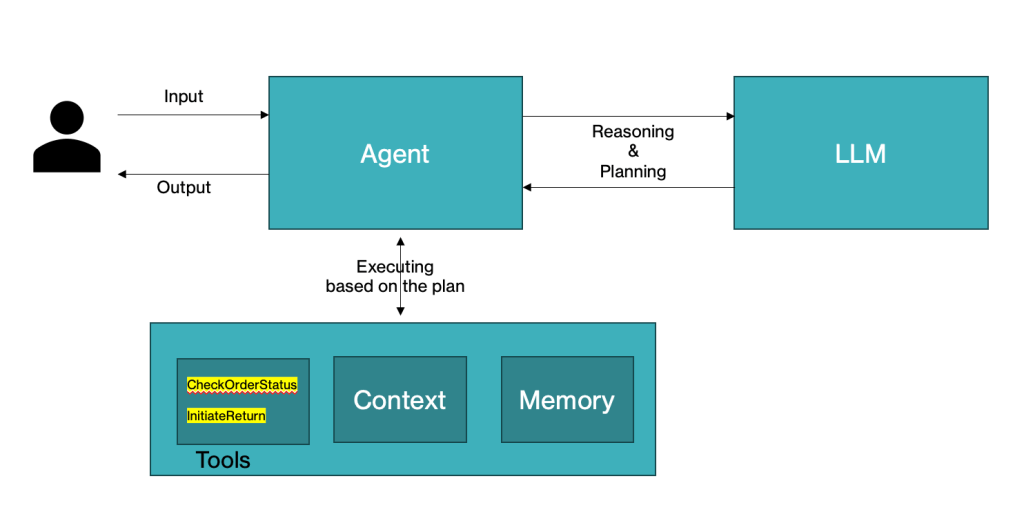
An AI agent in a customer service setting is designed to handle multiple types of tasks, ranging from order status inquiries to processing returns. In this context, the AI agent must decide which function (or tool) is the most appropriate based on the customer’s request. The ability of the agent to dynamically choose tools and execute them efficiently is what makes the agent intelligent and autonomous.
2. How the Agent Plans Tool Usage
For the AI agent to be effective, it needs a system that can:
- Understand the User’s Intent: The AI agent first needs to comprehend the customer’s query. This is where LLM comes into play. For example, if a customer asks, “What is the status of my order?” or “Can I return an item?”, the agent must recognize the intent behind the query (order status or return request) using LLM.
- Select the Right Tool: Once the agent understands the query, it needs to select the appropriate tool or function to perform the task. For instance:
- If the query is about order status, the agent will invoke the “CheckOrderStatus” tool to fetch and return the status of the order.
- If the query is about returning an item, the agent will choose the “InitiateReturn” tool to help the customer start the return process.
- Perform the Action: After selecting the tool, the agent invokes the corresponding function to take action. For example, it might fetch real-time data (like order status) or guide the user through a return process.
- Handle Edge Cases: The agent must also be able to handle situations where the query is unclear or doesn’t map to a predefined tool. For example, if the customer asks, “How do I cancel my order?” the agent may either request clarification or provide a general response, like redirecting the user to a more relevant service.
3. Using Multiple Tools in One Conversation
Sometimes, the customer may need multiple actions performed. For example, a user might ask about order status and then request a return for a product in that order. The agent needs to seamlessly handle multiple tools in a single conversation, ensuring smooth transitions between tasks. The memory component of the agent can be used to remember context, allowing the agent to keep track of the ongoing interaction.
4. Example Scenario
Let’s consider a simple scenario:
- Customer Query 1: “What is the status of my order 12345?”
- The agent recognizes that the user is asking for order status. It then calls the “CheckOrderStatus” tool to retrieve and return the status of the order.
- Customer Query 2: “I want to return my T-shirt.”
- The agent understands that the user wants to return an item from their order. It now calls the “InitiateReturn” tool to begin the return process.
5. Tools as Functions
Each tool is essentially a function designed to accomplish a specific task:
- CheckOrderStatus: This tool handles queries related to order tracking and status updates.
- InitiateReturn: This tool guides customers through the return process for items in their orders.
The beauty of this design is that the agent does not need to be hard-coded with specific responses. Instead, it dynamically selects the correct function based on the user’s request.
6. Benefits of Using Tools in Customer Service
- Scalability: As more customer service tasks are required (e.g., handling refunds, product recommendations), additional tools can be added to the agent’s toolbox without changing the core system.
- Flexibility: The agent’s ability to dynamically plan which tool to use based on context and conversation history allows for more natural and effective interactions.
- Efficiency: By automating repetitive tasks, the agent can help reduce the workload of human agents, providing faster resolutions for customers.
In Part 3, we’ll implement a customer service agent using the concept of dynamic tool selection based on the customer’s queries. The agent will interact with customers, determine which tool to use (e.g., checking order status or initiating a return), and provide the relevant responses.
 Vijaymathialagan.ai
Leave a comment